Free and powerful 3D modeling tool
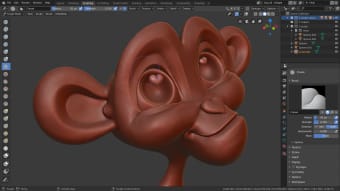
Blender is a free 3D modeling, rendering, texturing, sculpting, and animation application that has been around for a while. As an open-source tool, this graphic and design software has had many of its features credited to numerous artists, animators, visual effects enthusiasts, gamers, teachers, and other professionals.
Top Recommended Alternative

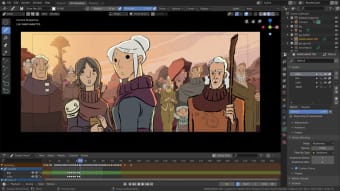
Blender is a multimedia creation tool that includes creating 3D models, applications, animated films, visual effects, video games, and more. Moreover, this program is available on multiple platforms, and it has an active community and constant development cycle also means it evolves rapidly, often with cutting-edge features being introduced well ahead of its peers.
What is Blender?
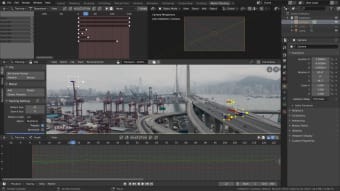
Blender is equipped with all the features needed to create and modify ultra-realistic models. With its many features, you can combine both 2D and 3D viewpoints, import raw footage, track camera movements, and do much more. Since the app also offers Python API, you can use the latter to make changes to your interface and customize it to your requirements. Still, the interface can be overwhelming.
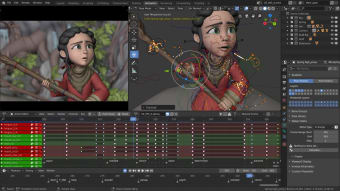
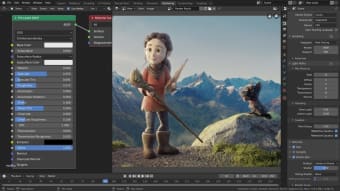
The streamlined interface gives you access to a range of useful features and 3D modeling tools. When you launch the program, you will notice a large viewing panel adjacent to some of the most frequently used tools. Other tools are neatly stacked inside drop-down menus available on the screen. In case you wish to switch tools to the main panel, you can customize and move things around.
That said, the program may seem complicated even to experienced users. You have to invest quite some time to learn the operations of all features. In return, you will be able to use the tool efficiently to create graphics that are on par with commercial 3D modeling tools. To help beginners get accustomed to the program, it offers extensive documentation, tutorials, and more guides from the community.
Blender 5.0's clearer color experience
Blender has taken a significant leap forward in how it handles color, making the entire creative process feel more predictable. The Blender 5.0 update introduces a color management system designed for modern hardware, supporting wide-gamut and HDR colors right from the start. In practical terms, this means you’ll see punchier highlights and more lifelike tones, ensuring that what you see on your screen actually matches what your audience sees when you export the final file.
To keep things consistent across the industry, the update now includes ACES viewing options alongside standard display profiles. This is particularly helpful for anyone working on HDR displays, as it allows for proper previewing and grading for high-end video formats. While the terminology can feel a bit dense, the core benefit is simple: it removes the guesswork, ensuring your work translates accurately across different devices, from smartphones to cinema screens.
Under the hood, each project now utilizes a dedicated "Working Color Space" to manage how light and materials interact. By supporting broader color ranges like Rec.2020, the software prevents colors from looking "crushed" or distorted when you push your lighting and effects to the limit. Whether you are working solo or collaborating in a studio environment, these changes provide a much more stable foundation, making the journey from the first light source to the final render far less stressful.
Blender 5.0's enhanced workflow and tools
Blender 5.0 focuses on cleaning up the friction in daily workflows, making the software feel much more approachable. The color pickers now feature a straightforward toggle between Linear and Perceptual modes, which helps you pick colors that actually look right to the human eye. By standardizing how brushes and palettes behave and adding descriptive tooltips directly into the UI, the update removes the technical "black box" that often frustrates artists who don't have a deep background in color science.
Procedural modeling gets a massive boost with the new Radial Tiling node. Instead of wrestling with complex math or messy workarounds to create circular patterns, you can now generate repeating, kaleidoscopic designs with a single node. It’s designed to be a versatile building block that fits right into the existing Geometry Nodes workflow. This means even if you're just starting out, you can build intricate, symmetrical shapes and maintain a clean, non-destructive project file without the usual headache.
Finally, texture baking is becoming the reliable tool it needs to be, especially when you're dealing with high-poly models. The 5.0 update addresses errors that used to plague high-to-low poly bakes and adds support for a wider variety of surface types. Being able to bake specifically to selected images and trust that subdivision behavior will match up perfectly is a huge win. For beginners and experienced users alike, this makes finishing detailed projects far less frustrating.
A versatile and free 3D creation powerhouse
Blender stands out as a free, open-source 3D modeling and animation tool, offering an extensive range of features for professionals and hobbyists alike. From modeling and sculpting to animation and visual effects, it provides powerful capabilities comparable to commercial software. While the learning curve can be steep, its active community, tutorials, and customization options make this an indispensable tool for creative projects across multiple industries.









.png)